Audit and Troubleshooting
The audit trail is the evidence layer of WingGate: every authentication event, grant change, session creation and termination, and file/MCP operation is recorded with the actor, result and time. This article shows how to query it and how to use it — together with the deployment logs — when a connection fails.
Query the audit trail
- Open your Organization and go to Audit.
- Filter by time range, actor (user or connector), action, and resource.
- Open an event to inspect its details: metadata, diagnostics, and technical context where available.
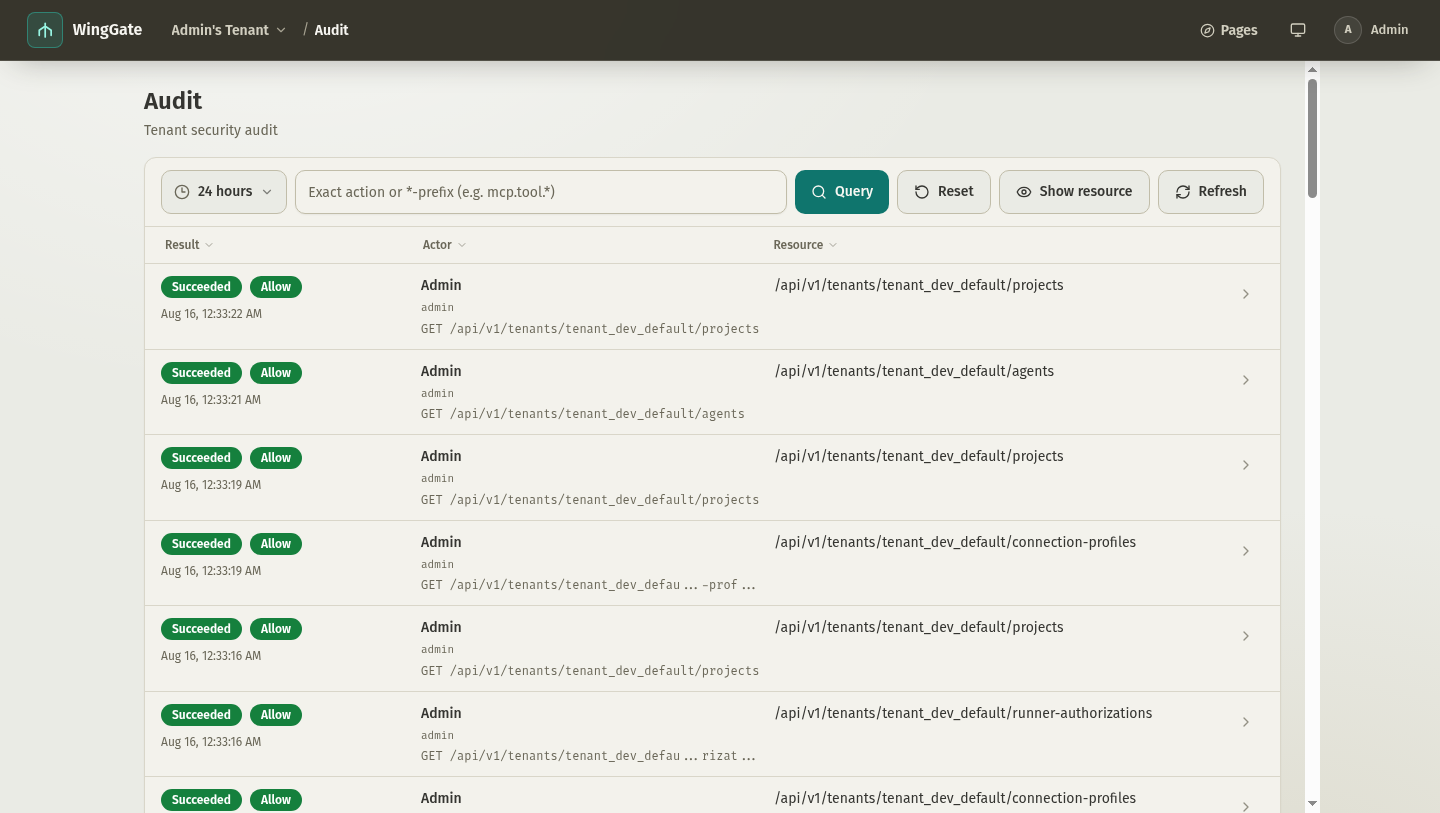
The event stream is append-only and organization-scoped. Every HTTP request and every MCP tool call writes at least one event, so the audit view can be large; use filters before paging through results.
What the audit records
Authentication, authorization decisions, session lifecycle and file/MCP operations, with the actor, result and time — the same boundary Audit and evidence defines by contract. Secrets never enter audit entries, logs or error responses.
Common failure patterns
connector offline
An offline connector means WingGate cannot reach the assets behind it. Check in order: outbound connectivity from the connector host to WingGate, the connector service state and logs on the host (journalctl -u winggate-connector-entry), and whether the connector's credential is still valid. See connectors.
Host key mismatch
A mismatch after the key was confirmed is a deliberate signal — a possible man-in-the-middle or a reinstalled host. Verify the cause out of band, then re-probe and confirm. Never override a mismatch you cannot explain; overrides are audited as deliberate actions. See Credential protection.
Not authorized
The member has no active grant for this Project, the asset is not in the Project or not ready, or (for MCP) the Project/asset MCP configuration does not allow the tool. Management-plane roles do not imply data-plane access.
MCP connection or call failures
- 401/403 — the credential was revoked, expired, or its scope does not cover the tool group. Recreate the Project MCP credential and update the client.
- 412 — the Project's MCP configuration changed and existing client sessions are invalid. Reconnect the client.
- 503 — the target asset has no online connector. Check connector and asset binding first.
Runner installing
The first Git/find/grep/runtime operation created an on-demand Runner installation Job. Wait for the Job — the original operation retries automatically once the Runner is verified. If the Job fails, check the Runner artifact configuration with your WingGate service operator.
Session closed as idle
Sessions close after the strictest of their idle timeout settings. Open a new session; review the Project or Organization idle timeout if the behavior is surprising.
Retention boundary
No automatic audit retention, archiving or partitioning: the table grows with every request — see Audit and evidence for the boundary. Audit events live in the WingGate service's database; if events go missing, start by checking the service's PostgreSQL connectivity and the audit table's availability.
If an audit entry is missing
- Confirm you are viewing the correct Organization and time range.
- Check the service logs for audit write failures; the service logs write errors without failing the affected request.
- For MCP events, confirm the connector's report was not lost in a retry — duplicate reports are deduplicated by a stable event id.